If you’re a marketer still hesitant to adopt AI, take a lesson from Andy Sachs in The Devil Wears Prada. At first, she dismissed fashion as unimportant to her role, much like you might assume AI isn’t necessary for content creation. She struggled at her job because she refused to adapt—just as you may find it harder to keep up using only traditional methods.
But once she embraced the needed change, she excelled.
Maybe you’re not skeptical, just unsure how to get started with AI. Either way, don’t leave money on the table. In this article, I’ll show you how to use AI to create better content and stay up to speed.
An Introduction to AI in Content Creation
What are Generative AI tools?
Generative AI tools are computer programs that create text, images, videos, or codes in response to a prompt. They analyze patterns in existing data to generate original content that mimics human creation.
Benefits of Integrating AI into Content Creation
Using AI tools in content creation allows you to:
Enhance Quality at Scale
By automating routine tasks, you can dedicate more time to refining and deepening your content.
Increase Content Variety
AI can transform a single piece of content into multiple formats, helping you produce diverse materials for different platforms.
Create more Targeted Content
AI assists with audience research and topic analysis, enabling you to create relevant, in-depth content.
Develop and Execute an Effective Content Strategy
Research by Deloitte shows that 30% of companies using AI for content production consider their content marketing strategy to be highly effective, compared to just 8% of companies that have not yet embraced AI.
AI serves as both a research assistant and brainstorming partner, helping you gather insights for content planning. It also assists in content creation, allowing you to execute your strategy more efficiently.
Keep reading to explore the practical ways you can use AI to plan, research, and create content.
Content Ideation
Struggling to Come Up with Content Ideas? It happens to the best of us.
Luckily, AI can help. By analyzing vast amounts of information in seconds, AI can generate fresh content ideas quickly and efficiently.
Here are some ways AI can help you discover new content opportunities:
Blog Topic Suggestions
AI can quickly generate a variety of blog topic ideas with a simple prompt. To test this, I used three different tools to find content ideas around “home workouts.”
- ChatGPT: Generated a list of 21 content ideas, neatly grouped into subcategories:
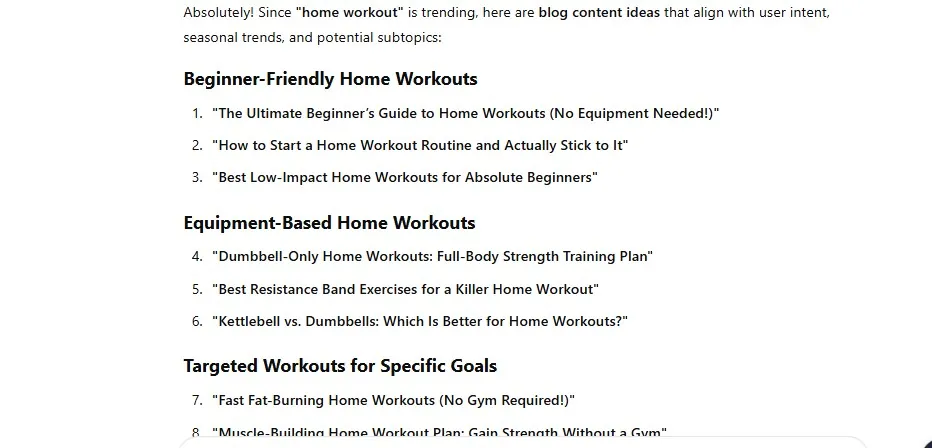
- Copy.ai: Suggested five content ideas, all of which were also found in ChatGPT’s list. Each topic came with a brief description outlining the article’s scope.
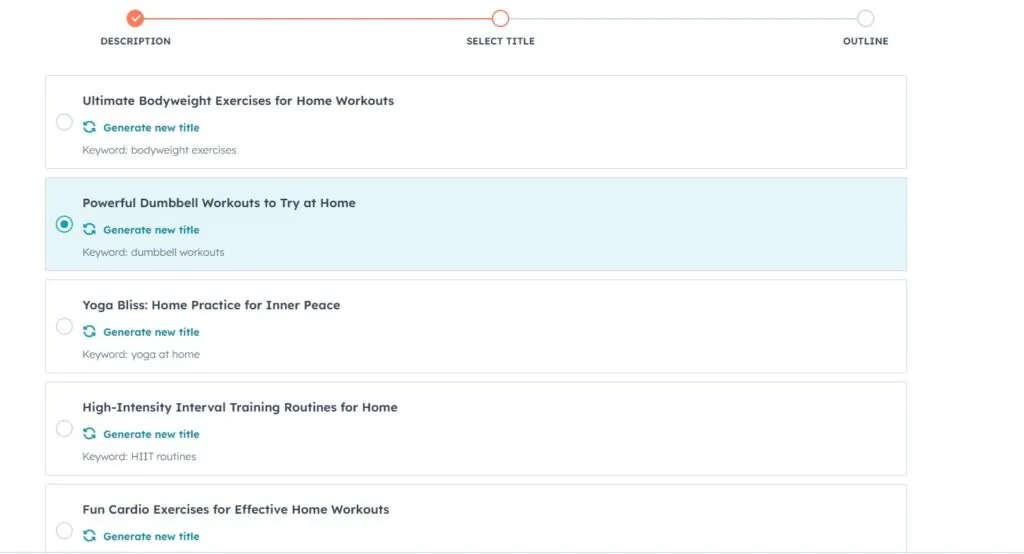
- HubSpot Blog Content Idea Generator: Started by generating five blog post ideas. Once I selected a topic and title, it created an outline and even drafted a full blog post.
Content Gap Analysis
- Keyword Analysis: Provide ChatGPT with a list of existing keywords or topics your content covers. Ask it to suggest related keywords and topics you may have missed. These gaps can serve as new blog post ideas.
- Analyzing Search Queries: Input a list of search queries that bring traffic to your site. Ask ChatGPT to compare the pages they lead to with the search intent behind those queries. If there’s a mismatch, ChatGPT can suggest content ideas to better align with user needs.
Competitive Content Analysis
- Finding Keyword & Topic Gaps: Provide ChatGPT with competitor data or SEO reports from tools like Ahrefs or SEMrush. Ask it to identify:
- Keywords your competitors rank for, but you don’t.
- Topics your competitors have covered that you haven’t.
- New topic opportunities based on competitor content.
Brainstorming with AI
Chatbots like ChatGPT and DeepSeek are great brainstorming partners. You can bounce ideas off them, get feedback, and explore new perspectives on your topics and audience.
AI can help you not only uncover new topics but also find unique and compelling angles to present your ideas.
For example, if you’ve identified a topic (the “what”), you can ask a chatbot to help you explore its “why” and “how.”
I asked DeepSeek how remote work impacts productivity and employee well-being. It provided a list of multiple answers, including its negative effects on employee well-being. I then chose to expand on the mental health aspect.
From there, it generated several ideas on the effects of remote work on mental health:
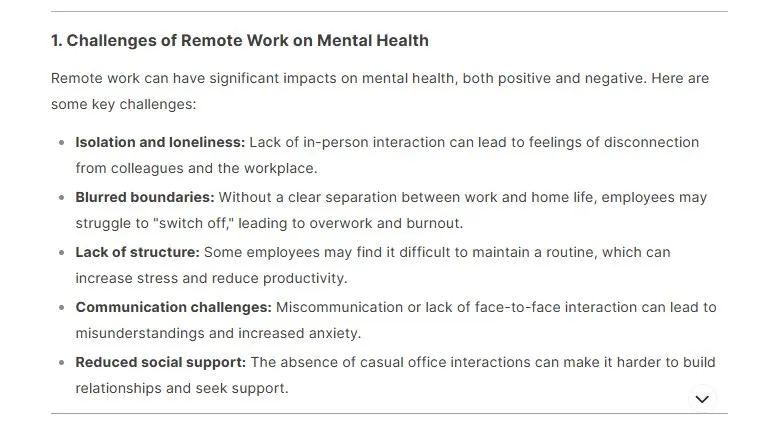
While the section on Challenges of Remote Work on Mental Health was useful, what stood out to me was the Unique Angles to Explore (something I wanted to research further).
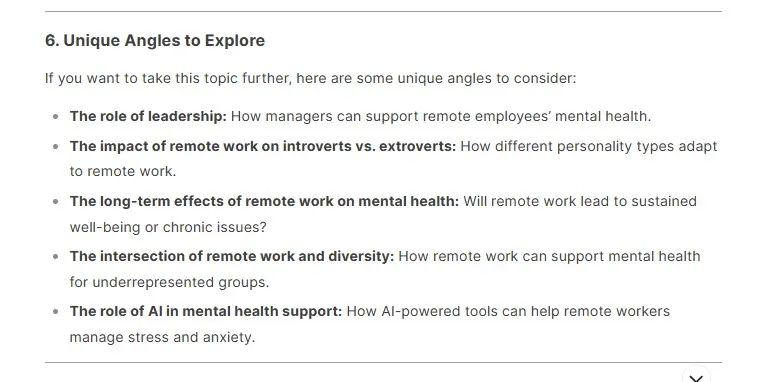
Example prompt with DeepSeek: Can you help me expand on the angle of remote work and mental health
Here are some other ways to refine your ideas with AI:
- Audience Insights – Learn about their preferred channels, tone of voice, concerns, and motivations.
- Exploring Concepts – Identify opposites, challenges, trends, and creative metaphors.
- Topic Expansion – Uncover clichés, emerging trends, fun facts, key statistics, and compelling data points.
Audience Research: Using AI to Gather Insights
AI tools, alongside traditional customer research methods, can help you gather valuable insights to plan and create content that meets your audience’s needs. These tools allow you to better understand your audience, refine your messaging, and develop an ideal client persona.
Two Ways to Use AI for Audience Research
1. AI-Assisted Customer Interviews
- Use ChatGPT to design surveys and questionnaires for collecting primary data.
- AI can suggest effective, targeted questions based on the insights you need.
2. AI for Secondary Research
AI can help analyze existing data sources to better understand your audience. This includes:
- Finding industry reports and market studies for relevant trends.
- Analyzing market research publications to identify audience behaviors.
- Using demographic and psychographic tools to refine client personas.
Research: Finding Information for Your Content
Cut down research time by using AI to quickly gather information from various sources. Instead of manually browsing multiple pages on search engine results, you can use AI to gain background knowledge on a topic more efficiently.
How ChatGPT Can Assist in Research
- Explaining Complex Concepts
- Simplify technical jargon and break down complex ideas into clear, easy-to-understand explanations.
- Summarizing Studies
- Condense lengthy research papers into concise summaries, highlighting key findings that you can incorporate into your content.
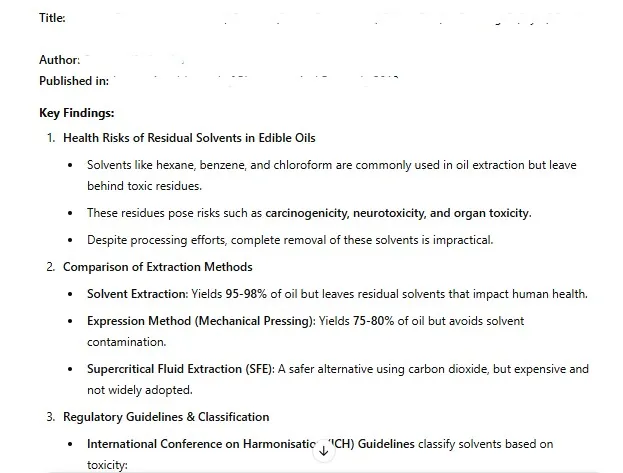
I used ChatGPT to condense a 13-page research paper into a two-page summary, highlighting its key findings in a clear, organized list.
Other AI Tools for Research
- Claude AI – Excellent for academic-style research and in-depth analysis.
- Perplexity AI – Great for finding data and sources since it cites references directly from the web.
A Word of Caution: Fact-Checking AI Outputs
AI models are prone to hallucinations; producing incorrect information. Always cross-check statistics, data, and claims with credible sources.
Briefs and Outlines
AI tools can quickly generate content briefs and outlines for top-of-funnel (TOFU) content.
However, while AI-generated briefs provide structure, they often lack strategic depth, falling short at aligning the article with your products/services and business goals. Refine your AI results manually to fix that.
Four AI Tools for Brief & Outline Generation
1. SEO Competitor Content Brief Generator (by Jonathan Boshoff)
- Best for SEO-focused briefs for popular topics.
It requires a target keyword + three competitor URLs as input. You can also include customization options such tone of voice, competitor analysis, and company details.
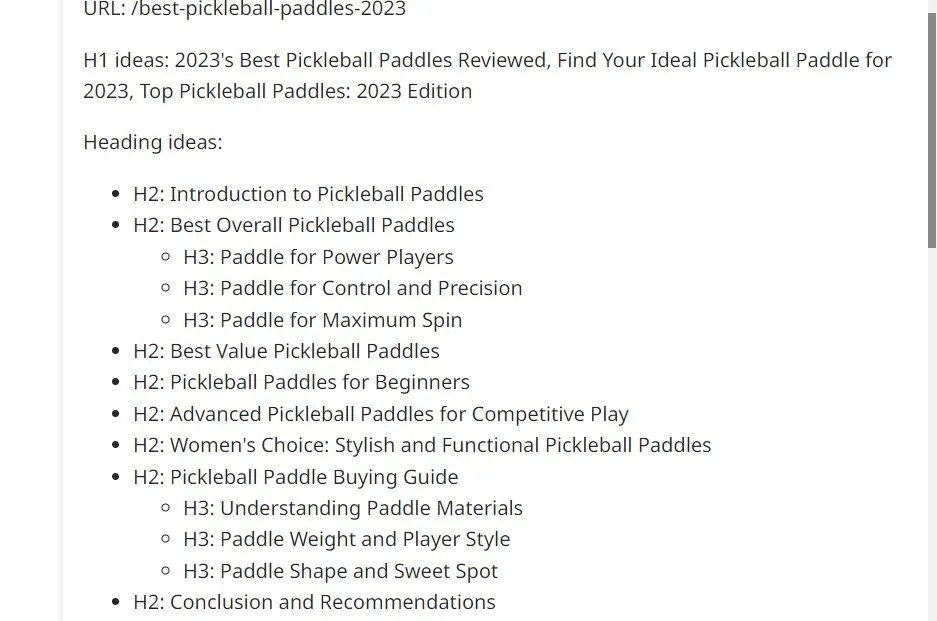
- Brief output:
- Comes as H2s and H3s outlines.
- Includes search intent, target persona, meta description, EEAT suggestions, FAQs, and CTAs.
2. ChatGPT for Briefs & Outlines
- The ideas and subheadings are logically structured.
I asked for a brief and an outline, respectively. The brief was very detailed, having the same H2s, H3s, and lists as the outline. The difference between both results was that the brief included objectives, key takeaways, and target audience, before the article outline.
3. Copy.ai Free Outline Generator
Input a topic and add any additional details to get an outline that has similar, but less detailed, H2s as a ChatGPT outline.
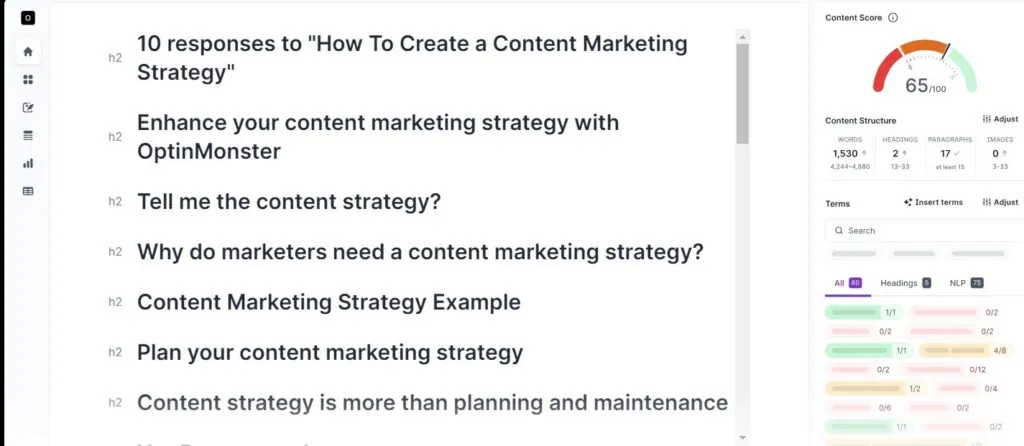
4. Surfer SEO Free AI Article Outline Generator Output:
- Less detailed than ChatGPT’s, providing only H2s without additional structure.
Drafting and Writing Articles
AI tools can help you overcome writer’s block by providing a starting point, though the initial output may be mediocre.
There are two main challenges with using AI for article writing:
- Lack of specialized knowledge – It doesn’t have firsthand knowledge or insights from original research about your topics.
- Limited human-like communication – AI writing lacks nuance and doesn’t mirror how real people speak. It also misses the terminology and tone specific to your target audience.
Still, AI can produce decent first drafts for ToFu topics. To get better results, generate drafts by sections instead of writing an entire article at once.
For conversion-based content, use AI as a writing assistant. Provide ideas, phrases, or bullet points, and let it turn them into complete sentences, paragraphs, and subheadings.
AI is also effective at pattern recognition, making it useful for finding additional examples or related ideas that follow the same structure.
My Experience with AI Writing Tools
Writesonic
The AI Article Writer 6 (the most advanced version) offers three writing modes and customizable options for keywords, brand voice, and length. It produces simpler sentences than typical AI-generated content.
Copy AI
- Generates simple, clear text. But, the result for a full blog prompt was short like a subheading.
The “OG” Chatbots:
ChatGPT:
Writes detailed subsections. However, it tends to create lengthy responses.
Gemini:
Though the writing is weaker than ChatGPT’s, it seems to follow the specifications
in prompts more accurately.
Perplexity:
Content quality is poor, often just summarizing popular pages on the web. But, it cites references, and that may count for something.
Creating Other Forms of Content
Editing transcripts
Use ChatGPT to clean up video or podcast transcripts and convert them into readable text. I use Tactiq.io to transcripts from YouTube videos, then ask ChatGPT to format them into normal paragraphs.
Creating Images
AI tools can create imaginative scenes that don’t exist in reality. The type of images that are used for memes and satirical content.
This tool can generate a wide range of images, from illustrations to realistic visuals.
Example prompt: “Imagine a funeral scene with people dressed in mourning attire standing near a headstone engraved with ‘SEO 1997–2024.’ Add a caption: SEO is dead”.
Output:

Canva: Good for creating cartoon-style illustrations.
Picsart: Not ideal for complex, imaginative scenes but works well for simple prompts like “a cottage on an island.”
Generating Audios
Convert text into audio using AI-powered text-to-speech tools such as:
Podcastle: Creates audio files from scripts.
Veed.io: Generates podcasts or voiceovers from text input.
Most other text-to-audio or video tools focus on repurposing articles into multimedia content. See more about them in the content repurposing section below.
Repurposing Content for Distribution
Use AI to create multiple content formats from a single piece for distribution across different channels.
Turning Long-Form Content Into Multiple Formats
You can break down long-form content such as blog posts, white papers, webinars, or YouTube videos into various shorter content types suited for different platforms.
1. Video Clipping for Social Media
Trim long videos into bite-sized snippets for social media using:
These tools also help with:
- Resizing videos for different platforms
- Adding subtitles and captions
- Trimming content to meet time limits
- Adjusting aspect ratios for different social media formats
2. Creating Social Media Text Posts From Long-Form Content
Convert video transcripts, blog posts, reports, or white papers into engaging social media posts.
AI tools that can help:
- ChatGPT – Generate hooks, headlines, and key takeaways
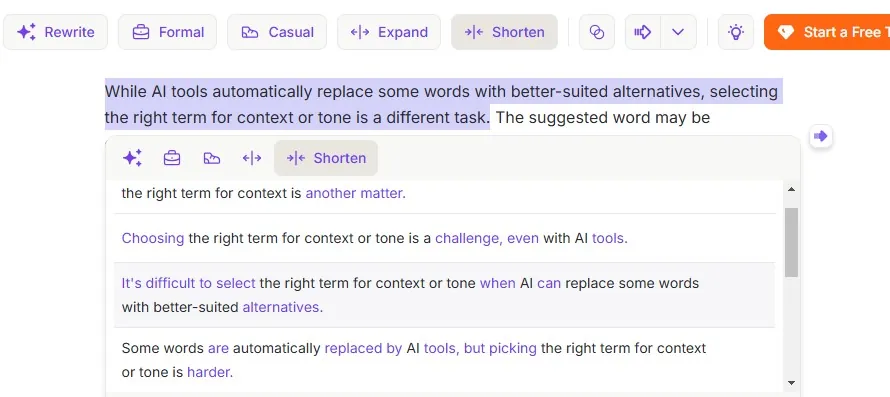
- Wordtune – Paraphrase and refine text for better readability
3. Converting Text Into Videos
Transform written content into videos with AI-powered tools:
- SEMrush AI Video Marketing Automator – Converts blog posts into explainer videos that can be automatically published on social media.
- Lumen5 – Turns blog posts and white papers into videos with AI.
- Descript – Converts long-form articles into video scripts and AI voiceovers.
Repurposing Content for the Same Platform
Matt Barker shared a LinkedIn content repurposing method in his newsletter:
- He uses ChatGPT to rewrite the same message from a different angle to keep posts fresh. Get his prompt here.
This approach can work for repurposing content on any platform, whether it’s LinkedIn, Twitter, or Instagram.
Proofreading
AI is effective at proofreading and can help rewrite text for clarity and coherence. It learns from vast amounts of text to apply standard English conventions.
However, this focus on formal structure is a disadvantage when you want your writing to sound conversational. In that case, don’t ask AI to proofread the entire text. Instead, request that it flag problem areas and suggest improvements.
Fact-checking
You can use AI to verify minor details or catch inaccuracies when you proofread text. This is ironic because AI sometimes generates misleading or false claims, a phenomenon known as AI hallucination (or confabulation). Still, you can use it for checking basic information which can be found with a Google search because it’s faster. But, be skeptical of technical details unless confirmed elsewhere.
For example, in the introduction to this section, I initially stated that AI has a database of all aspects of grammar and standard English. However, when I asked ChatGPT to verify, it clarified that AI learns from large datasets and predicts language patterns based on probability.
You can also use AI to flag statements that may need verification, serving as a reminder to check key claims.
Word Choice and Synonyms
While AI tools automatically replace some words with better-suited alternatives, selecting the right term for context or tone is a different task. The suggested word may be grammatically correct or understandable to a general audience, but you might need a specific term to convey the right nuance.
For instance, you could ask: “What’s a more upbeat term to replace ‘gratefulness’ In this context?”
Providing AI with the full sentence helps ensure the replacement fits your intended tone.
U.S. vs. U.K. English Variations
AI can help adapt your writing for different English variations. If you typically write in U.S. English but need a U.K. version, AI can adjust spellings, word choices, and units of measurement accordingly.
On page SEO
Image Description
Though, It will take you about the same time to write up a description for an image
- ChatGPT – On asking it to shorten the initial 7-line result, I got a nice descriptive three-liner.
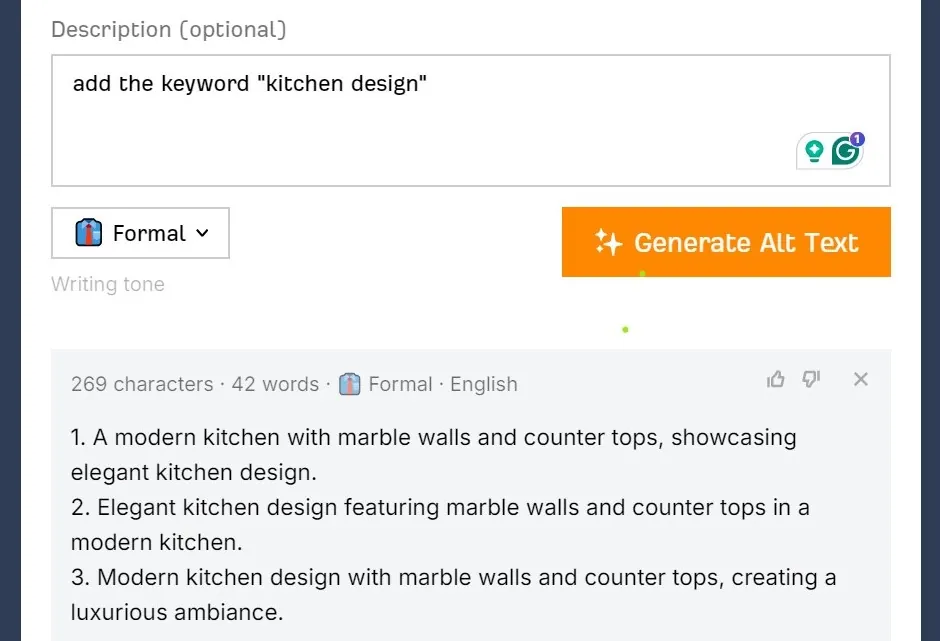
- Ahrefs Free AI Image Alt Text Generator – Provides straightforward but overly brief descriptions.
Meta Tags and Descriptions
AI tools can generate meta titles and descriptions that include target keywords.
- ChatGPT – Produced the best meta description among the tools I tested. You can refine its output further.
- Ahrefs Free Meta Description Generator – Generates concise meta descriptions. I input my page title and selected a “confident” tone.
- Frase.io Meta Description Generator – Requires you to choose a title and keyword. The generated descriptions are basic.
Finding Linking Opportunities
ChatGPT can help identify internal and external linking opportunities.
Internal Links
Provide the topic you’re writing about, and it will suggest relevant internal links by:
- Identifying overlapping content on your site.
- Recommending where to insert links and explaining how they improve SEO and user experience.
Example Prompt: “Find articles related to ‘WordPress SEO’ on my site and suggest internal links based on relevance.”
External Links
Ask ChatGPT to pinpoint where external links would be beneficial, such as:
- Supporting claims with authoritative sources.
- Providing references for technical terms, complex concepts, or key statistics.
Example Prompt: “Highlight areas in this paragraph where external links would add value.”
How to Integrate AI Into Your Workflow
1. Identify Where AI Can Be Most Useful
Analyze your content creation process to pinpoint areas where AI can improve efficiency. Gather feedback from your team on time-consuming or repetitive tasks, and introduce AI to automate those processes.
2. Train, Support, and Assign AI Responsibilities
Most AI tools are intuitive, but allow time for your team to adapt. For complex tasks or advanced AI features, provide training on specific hacks or best practices.
Assign AI oversight to team members with relevant expertise. Those unfamiliar with the content standards may be unable to distinguish high-quality outputs from low-quality ones.
3. Measure and Optimize
It is easy to measure efficiency with AI. It usually reduces time spent on tasks. However, effectiveness requires deeper analysis.
Compare AI-generated content vs. manually created content to assess engagement and performance. For example:
- How does audience engagement differ between AI-repurposed content and manually repurposed content?
Use these insights to refine your AI implementation and content processes.
Ethical Issues to Consider
- Misinformation & AI Hallucination
- Always fact-check AI-generated content, especially for technical, medical, or legal topics.
- Bias & Fairness
AI models can inherit biases from the data they are trained on, leading to biased or unfair content.- Check outputs for stereotypes, discrimination, or harmful narratives. In these cases, correct the tool by providing accurate information and reinforcing fair, factual perspectives.
- Manipulation and Misuse
AI can be used to create deceptive or manipulative content, such as deepfakes or fake reviews.- Implement rules within your team to prevent misuse
Being Unique in an AI-Driven Content World
AI makes it easier to stand out because it frees up time, allowing you to go the extra mile to offer unique value. Here’s how you can differentiate your content:
- Conduct Original Research
Generate unique data that isn’t available elsewhere. Since AI relies on existing data, this gives you insights that others can’t easily replicate. - Share Personal Experiences
Include real-world applications, anecdotes, and lessons in your content. These Are unique to you. - Go Beyond Text
Invest in visuals, interactive content, and multimedia to create a richer, more engaging experience that makes your brand memorable.
Staying Ahead with AI
These processes and methods are just a starting point to help you explore how AI can support your content creation. Every team—especially small teams—has unique needs, so your best use cases will come from testing and refining AI tools to fit your workflow.
Stay up to date with new AI tools and improvements to existing ones. For example, DeepSeek AI has been generating buzz recently. When I tested it, I found it useful for brainstorming and logical analysis, but I still prefer ChatGPT for content creation.
Keeping an open mind and continuously learning will help you maximize AI’s potential and stay ahead in content creation.